
How to Change Name in Aadhaar Card (Online & Offline – Step-by-Step Guide)
Changing your name in Aadhaar Card is a common requirement after marriage, spelling mistakes, legal name change, or mismatch with documents. The good news is that the Aadhaar name correction process is simple, and you can do it online or offline through official channels provided by Unique Identification Authority of India (UIDAI).
This detailed guide explains how to change name in Aadhaar Card, required documents, fees, processing time, common mistakes, and FAQs.
Why You May Need to Change Name in Aadhaar Card
You may want Aadhaar name correction due to:
-
Spelling mistakes in Aadhaar
-
Name change after marriage
-
Legal name change
-
Name mismatch with PAN, Passport, Bank records
-
Incorrect surname or initials
Keeping Aadhaar details accurate is important because it is linked with PAN, bank accounts, mobile number, ration card, and government schemes.
Types of Name Changes Allowed in Aadhaar
UIDAI allows:
-
Minor correction (spelling mistake)
-
Full name change (legal change / marriage)
-
Addition or removal of surname
⚠️ Note: Aadhaar allows limited number of name updates, so ensure documents are correct.
Documents Required for Aadhaar Name Change
You need any one valid Proof of Identity (PoI) document:
-
PAN Card
-
Passport
-
Voter ID
-
Driving License
-
Government-issued Photo ID
-
Marriage Certificate (for name change after marriage)
-
Gazette Notification (for legal name change)
📌 Document name must match the new name you want in Aadhaar.
How to Change Name in Aadhaar Card Online
Follow these steps carefully:
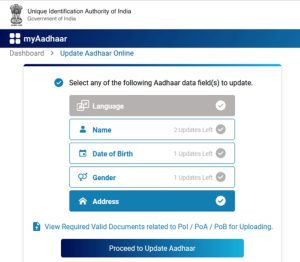
Step 1: Visit Aadhaar Update Portal
Go to UIDAI’s Self Service Update Portal (SSUP).
Step 2: Login Using Aadhaar Number
-
Enter Aadhaar number
-
Verify with OTP sent to registered mobile number
Step 3: Select “Name Update”
Choose Update Name option.
Step 4: Enter Correct Name
Type your full name exactly as per PoI document.
Step 5: Upload Supporting Document
Upload scanned copy (PDF/JPG) of valid PoI.
Step 6: Pay Fee
-
Fee: ₹50
-
Payment via UPI, debit card, net banking
Step 7: Submit & Save URN
You’ll receive a Update Request Number (URN) to track status.
How to Change Name in Aadhaar Card Offline

If online update is not possible, choose offline mode.
Steps:
-
Visit nearest Aadhaar Enrollment / Update Center
-
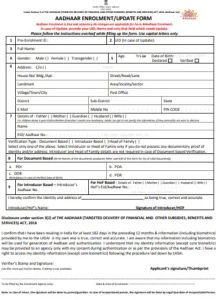
Fill Aadhaar Correction Form
-
Submit PoI document
-
Provide biometric verification
-
Pay ₹50
-
Collect acknowledgment slip
🕒 Processing time: 7–30 days
How to Check Aadhaar Name Update Status
-
Visit UIDAI update status page
-
Enter URN / Aadhaar Number
-
Verify OTP
-
Track current status
Once approved, you can download updated Aadhaar PDF.
Download Updated Aadhaar Card After Name Change
After approval:
-
Visit Aadhaar download page
-
Enter Aadhaar/VID/Enrolment ID
-
Verify OTP
-
Download e-Aadhaar (Password protected PDF)
📄 PDF password = First 4 letters of name (CAPS) + Year of Birth
Common Mistakes to Avoid
-
Uploading unclear documents
-
Name mismatch between form & document
-
Using nickname instead of full legal name
-
Multiple correction requests
-
Incorrect document format or size
Avoid these to prevent rejection or delay.
Aadhaar Name Change – Important Points
-
Name update allowed limited times
-
Online update requires registered mobile number
-
Offline update needs biometric verification
-
Always use official UIDAI portal
-
Keep URN safe for tracking
SEO Keywords Covered Naturally
-
how to change name in aadhaar card
-
aadhaar name correction online
-
aadhaar card name change process
-
update name in aadhaar
-
aadhaar correction form
-
aadhaar update online
-
name change in aadhaar after marriage
(Used naturally to avoid keyword stuffing 🚀)
FAQs – Aadhaar Name Change
Q1. How many times can I change my name in Aadhaar?
UIDAI allows limited updates. Exact limit depends on UIDAI policy and verification.
Q2. Can I change Aadhaar name without documents?
❌ No. Valid Proof of Identity is mandatory.
Q3. Is Aadhaar name change free?
❌ No. Fee is ₹50 per update request.
Q4. How long does Aadhaar name correction take?
Usually 7–30 days, depending on verification.
Q5. Can I change surname only?
✅ Yes, surname addition or removal is allowed with valid proof.
Q6. What if my Aadhaar name update is rejected?
You can reapply with correct documents and details.
Final Words
Changing your name in Aadhaar Card is easy, secure, and fully digital if done correctly. Always ensure your documents are accurate and match the name you want to update. A correct Aadhaar record avoids future issues with banking, PAN linking, subsidies, and government services.
More Related Blog – Phone Battery Draining Fast – Causes & Fix -Updated 1