
How to Check PF Balance Online – Complete Step-by-Step Guide (2026)
Checking your PF balance (Provident Fund balance) is one of the most important things every salaried employee in India should know. Your EPF account is not just a savings tool but also a long-term financial safety net. The good news? You can check your PF balance online, by SMS, missed call, mobile app, or passbook—without visiting any office.
This detailed guide explains all methods to check PF balance, common problems, solutions, and FAQs, written in a simple, Google-friendly way to help you rank better and stay future-proof.
What is PF (Provident Fund)?
How to Check PF Balance Online
Employee Provident Fund (EPF) is a government-backed retirement savings scheme managed by Employees’ Provident Fund Organisation.
Both employee and employer contribute 12% of the basic salary every month, which earns interest and can be withdrawn under specific conditions.
Details Required to Check PF Balance
Before checking your PF balance, ensure you have:
-
UAN (Universal Account Number)
-
Registered mobile number with UAN
-
Active UAN (KYC verified)
-
Internet connection (for online methods)
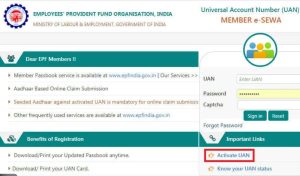
Method 1: Check PF Balance Online Using UAN Portal
This is the most reliable and detailed method.
Step-by-Step Process
-
Visit the official EPFO member portal
-
Click on Member Login
-
Enter your UAN, password, and captcha
-
Login and select View → Passbook
-
Choose your employer to see the PF balance
Benefits
-
Shows employer & employee contribution
-
Displays interest earned
-
Downloadable statement
SEO Keywords used:
check PF balance online, UAN PF balance check, EPF balance login
Method 2: Check PF Balance by Missed Call
This is the fastest method—no internet needed.
Steps
-
Call 011-22901406 from your registered mobile number
-
The call disconnects automatically
-
You’ll receive an SMS with your PF balance
Important Conditions
-
UAN must be active
-
Mobile number linked with UAN
-
At least one KYC (Aadhaar/PAN/Bank) approved
Method 3: Check PF Balance via SMS
Format
Send SMS to 7738299899
Message:EPFOHO UAN
You’ll receive PF details in your preferred language.
Supported Languages:
English, Hindi, Tamil, Telugu, Bengali, Marathi, and more.
Method 4: Check PF Balance Using UMANG App
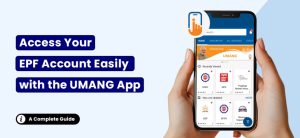
Steps
-
Install UMANG App from Play Store/App Store
-
Register using your mobile number
-
Open EPFO → Employee Centric Services
-
Select View Passbook
-
Enter UAN and OTP
Advantages
-
Mobile-friendly
-
Secure OTP login
-
Access other government services
Method 5: Check PF Balance Through EPF Passbook
You can also view or download your EPF Passbook online.
Steps
-
Visit EPF passbook portal
-
Login using UAN & password
-
Download monthly contribution statement
⚠️ Note: Passbook may not update instantly for current employer.
Common Problems While Checking PF Balance (And Solutions)
❌ UAN Not Activated
✔ Activate UAN on EPFO portal
❌ Mobile Number Not Linked
✔ Update profile → Contact details → Verify via OTP
❌ KYC Not Approved
✔ Upload Aadhaar/PAN/Bank details and wait for employer approval
❌ Incorrect PF Balance
✔ Check passbook or raise grievance on EPFO portal
Why Checking PF Balance Regularly is Important
-
Confirms employer deposits
-
Helps in tax planning
-
Avoids future withdrawal issues
-
Tracks interest growth
-
Detects employer non-compliance early
PF Balance Withdrawal – Quick Overview
You can withdraw PF for:
-
Job change (partial)
-
Medical emergency
-
Marriage or education
-
Home purchase
-
Retirement
Always check PF balance before initiating withdrawal.
PF Balance Check – SEO Keyword List Covered
-
how to check pf balance
-
pf balance check online
-
epf balance check by uan
-
pf balance missed call
-
pf balance sms
-
umang app pf balance
-
epf passbook download
-
provident fund balance check
Frequently Asked Questions (FAQs)
Q1. Can I check PF balance without UAN?
No, UAN is mandatory for all PF balance check methods.
Q2. How many times can I check PF balance?
Unlimited times. There is no restriction.
Q3. Is PF balance check free?
Yes, all methods are completely free.
Q4. How often does PF balance update?
Usually monthly after employer contribution.
Q5. Can I check PF balance for previous employer?
Yes, using EPF passbook or UAN portal.
Q6. What if PF balance shows zero?
It may be due to:
-
New account
-
Delay in employer contribution
-
Technical update lag
Final Words
Knowing how to check PF balance empowers you to stay financially aware and secure. Whether you prefer online login, SMS, missed call, or mobile apps—EPFO has made everything simple and transparent.
If you regularly monitor your PF account, you avoid future withdrawal problems and ensure your employer is depositing funds correctly.
👉 Pro Tip: Bookmark the EPFO portal and check your PF balance at least once every 3 months.
More Related Blog – Phone Battery Draining Fast – Causes & Fix -Updated 1